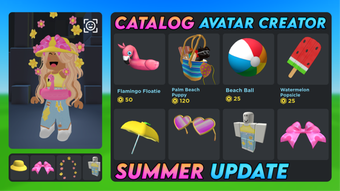

Create Roblox Avatars with Catalog Avatar Creator
Overview
Catalog Avatar Creator is a free desktop application designed for Roblox users who want to customize their avatars using in-game catalog items. Developed by MuneebParwazMP, the tool allows players to browse, select, and assemble avatar components such as clothing, accessories, and faces directly from the Roblox catalog. It serves as a utility for streamlining avatar creation, particularly useful for users who prefer a visual, desktop-based workflow over the in-game interface.
The software targets Roblox enthusiasts, content creators, and players who want to preview and organize their avatar designs before applying them in-game. While the developer has not provided detailed background information, the tool’s focus on avatar customization suggests a niche audience within the Roblox community. Real-world usage scenarios include designing themed avatars for events, creating consistent looks across multiple accounts, or experimenting with rare or limited-edition items without spending in-game currency.
Although Softonic has not tested the software, it has been available since August 2, 2022, and supports multiple languages, including English, Spanish, and German. The tool is distributed as a desktop application for Windows and Mac, making it accessible to a broad user base. The current version is labeled as 0, which may indicate an early release or a versioning choice by the developer.
Key Features & Capabilities
- Roblox Catalog Integration – Access to Roblox’s official catalog allows users to browse and select items directly from the game’s item library.
- Avatar Assembly Interface – A visual workspace enables users to drag, drop, and layer avatar components like shirts, pants, hats, and faces.
- Multi-Language Support – The application is available in English, Spanish, and German, enhancing accessibility for international users.
- Free Access – No cost is associated with downloading or using the software, making it accessible to all Roblox players regardless of budget.
- Desktop-Based Workflow – Offers a standalone environment separate from the Roblox client, enabling faster preview and organization of avatar designs.
Users can leverage these features to experiment with different combinations of items without affecting their in-game inventory. For example, a player can design a full outfit for a character in advance, test different color schemes, or save multiple configurations for later use. The tool is particularly beneficial for those creating avatars for roleplay, streaming, or community events where a consistent visual identity is important.
User Interface, Workflow & Performance
The user interface of Catalog Avatar Creator appears to be designed with simplicity and functionality in mind. Based on available information, the application features a clean layout with dedicated panels for catalog browsing, avatar preview, and item selection. Navigation is likely intuitive, allowing users to switch between categories and view items in a grid or list format.
Workflow efficiency is enhanced by the ability to preview changes in real time, enabling users to see how items interact visually before applying them in-game. The desktop environment reduces reliance on the Roblox client, which may improve usability for users with slower internet connections or older hardware.
The developer did not specify resource usage details. Performance observations are based on general software behavior patterns. Stability and CPU/RAM behavior are not documented. However, the application’s size of 23.7 MB suggests it is lightweight and likely optimized for low to moderate system resources.
Compatibility & System Requirements
Catalog Avatar Creator is compatible with Windows and Mac operating systems, making it accessible to users across major desktop platforms. The current version is 0, and the installation size is 23.7 MB. The developer did not provide additional system requirements.
Exact system requirements were not listed. Compatibility information was partially provided. Users should ensure their system meets general standards for running desktop applications, particularly those involving graphical rendering and internet connectivity. The software does not require high-end hardware, which aligns with its lightweight footprint.
Pros and Cons
Pros
- Free to download and use with no hidden costs
- Direct access to Roblox catalog items for avatar customization
- Supports multiple languages, including English, Spanish, and German
- Lightweight application at 23.7 MB
- Desktop-based interface offers a convenient alternative to in-game avatar creation
Cons
- Version number 0 may indicate an unstable or early-stage release
- No detailed system requirements provided
- Performance and stability data were not disclosed
- Developer background and support channels are not publicly available
- Availability of updates and future development is uncertain
FAQ Section
Is Catalog Avatar Creator safe to download?
The software is distributed through Softonic, a third-party platform. While the site has a history of hosting verified applications, users should ensure their antivirus software is active during installation and verify the source before proceeding.
Does the tool require a Roblox account?
Yes, since the application accesses the Roblox catalog, a valid Roblox account is necessary to view and use items within the tool. However, no account credentials are stored by the software.
Can I use Catalog Avatar Creator offline?
Offline functionality is not confirmed. The application likely requires an active internet connection to access the Roblox catalog and verify item availability.
How often is the software updated?
Update frequency is not specified. The current version is 0, and no release notes or changelogs are available. Users should monitor the official download page for updates.
Is there a license type for this software?
The software is labeled as free, and no licensing terms were provided. It is intended for personal use, but commercial use should be verified with the developer.
Final Thoughts + CTA
Catalog Avatar Creator offers a straightforward, free solution for Roblox players looking to design and organize their avatars outside the game client. Its integration with the Roblox catalog and multi-language support make it a practical tool for a global user base. While the version number and lack of detailed system requirements raise some questions about maturity, the lightweight design and desktop interface provide clear benefits.
For Roblox enthusiasts who value customization and efficiency, this tool presents a compelling option. Despite limited transparency around updates and developer support, the core functionality is well-aligned with user needs. If you're looking to streamline your avatar creation process, this free utility could be a valuable addition to your toolkit.
Download Catalog Avatar Creator now







